
Download PwDone
Editions are separate installers that share the same engine. Pick the one for your files, or grab All editions. Available for Windows. macOS coming soon.. Latest release: v0.1.0. How it works.
Older versions, release notes and checksums: GitHub Releases
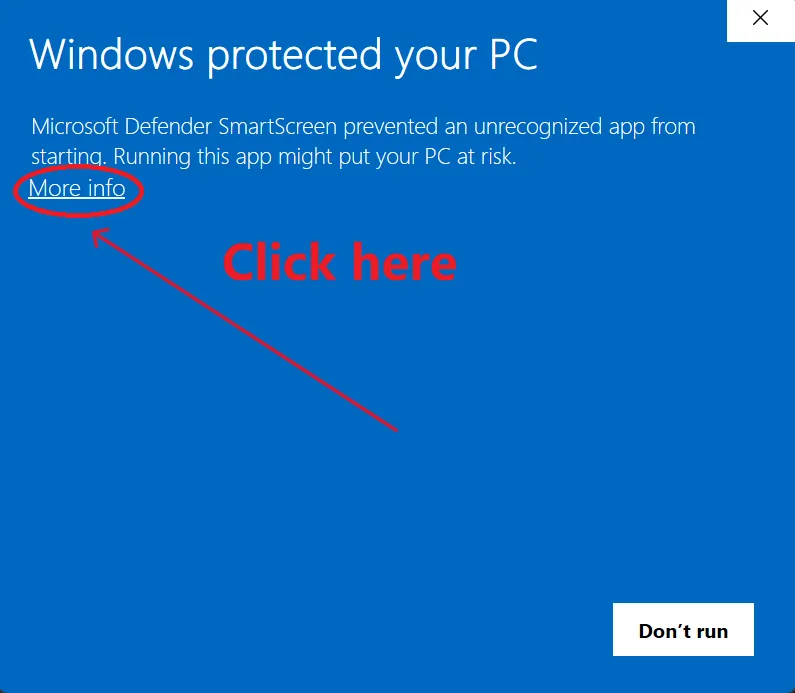
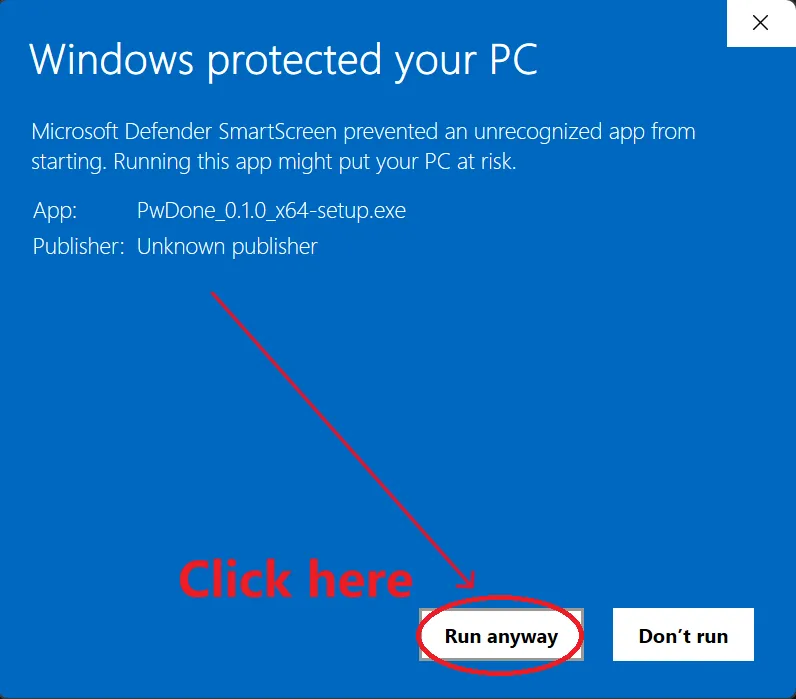
Windows may show a SmartScreen warning because the installer is not yet code-signed. Click More info, then Run anyway. See illustrated steps.
Before you install
- Windows 10/11 (64-bit). macOS version coming soon.
- All processing is local. No upload, no telemetry.
If Windows SmartScreen appears
Early builds may not be code-signed yet. On Windows, SmartScreen may show "Windows protected your PC". Choose More info, then Run anyway. When macOS builds ship, you may need to right-click the app and choose Open the first time.
Verify your download
Checksums are published next to each installer:SHA256SUMS-windows.txt.